The common Insider Risks and how to mitigate them

In Part 1 (read it here), we established the strategic and collaborative foundations of Insider Risk Management.

Now, we move to the practical hands-on application of IRM: how to detect and investigate the specific patterns of insider risk using Microsoft Purview. This section is for those who are ready to implement these controls.

Let’s look at the 4 common patterns (plus an extra special one about AI) that most organisations sees their employees do when they try taking data out of the organisation…whether they are intentional about it or not.
The Departing Employee risk

People sometimes take client lists, pricing files, or other company information when they are about to leave because they think it will help them in their next job. They may want to keep customer relationships, prove their value to a new employer, or make their move to a competitor easier and faster. Some also tell themselves that the information is “theirs” because they worked on it or built those client relationships.

In other cases, the reason is fear or frustration. A departing employee may worry that once they leave, they will lose access to important contacts, documents, or knowledge, so they copy it “just in case.” Even if they do not see themselves as doing something serious, taking company data before leaving can expose the organisation to legal, commercial, and security risk.

Insider Prevention tip: Use HR connectors to flag resignations. Configure a policy that monitors for unusual collecting/sharing 90 days pre-departure.
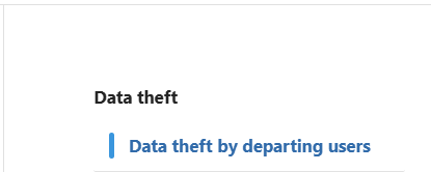
Inside Purview Insider Risk Management > Head to Policy then select the template Data theft by departing users. Then Select the HR connector configuration screen for Insider Risk Management. This is used to import resignation or employment status data for departing employee risk indicators.

Here’s the link on how to setup the connector: LINK

How to use these settings: Configure the HR connector to bring in employee status changes, such as resignations or planned departures. After the connector is active, map the relevant HR fields correctly and verify that departing users are being detected. You can then use this signal in an Insider Risk Management policy to increase scrutiny during the pre-departure window.

The Email to self risk

The “remote work” excuse – emailing sensitive attachments to their own personal accounts (Gmail, Outlook.com, etc).

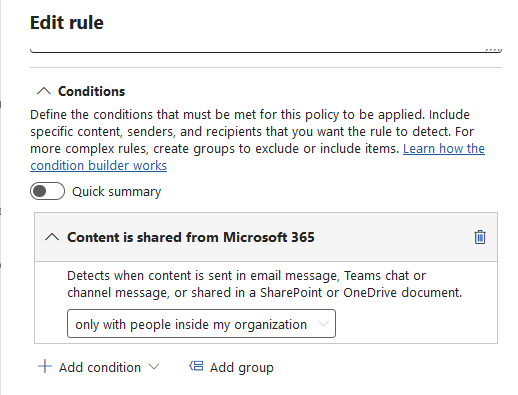
Mitigate this by creating a policy for detecting emails with attachments sent to personal email accounts or other external recipients.
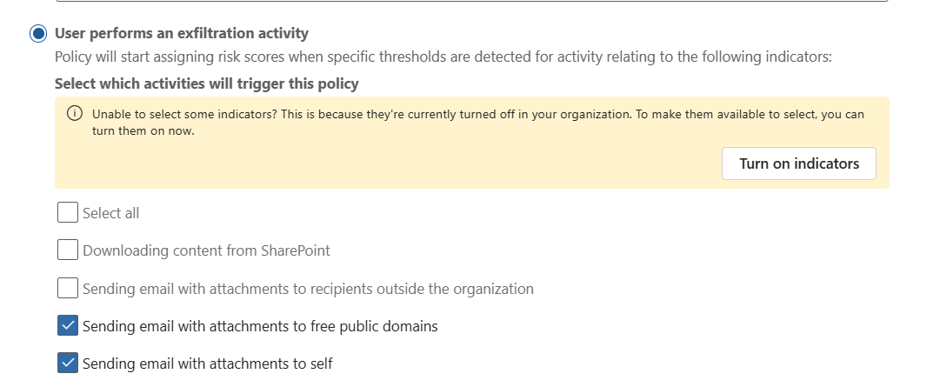
How to use these settings: Select indicators for email activity to external recipients and focus on messages that include attachments. If available in your configuration, narrow the scope to personal domains and combine the policy with sensitivity labels or priority content so that high-value data is reviewed first.

Implementation Tip: Detect emails with attachments to personal domains. Correlate this with sensitivity labels to prioritise high-value data.

The Drip transfer risk

There are users who try to be sneaky by diong small, repeated transfers over time that individually look benign but collectively represent a significant leak.

To mitigate this, set your threshold or sequence settings for repeated low-volume transfers to the same external recipient over time. You can even use the same policy as the Email to Self policy above.
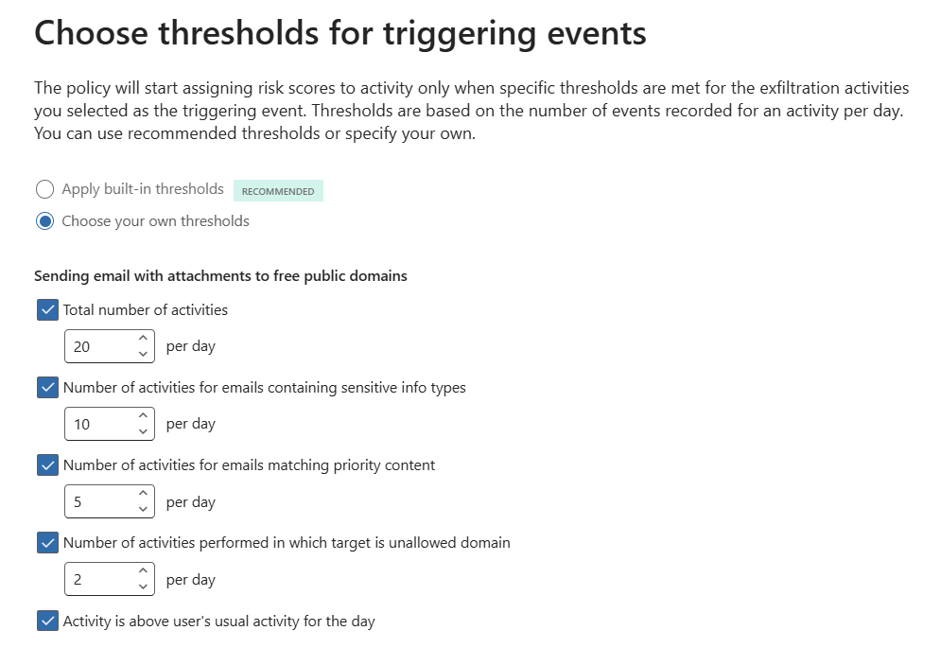
How to use these settings: Set thresholds that look for repeated actions rather than one large event, such as multiple small sends to the same recipient across several days. Tune the volume, frequency, and time window so the policy can identify slow exfiltration patterns without creating too many false positives.

Implementation Tip: Set thresholds for repeated sends to the same external recipient. Use volume-based triggers to catch this slow-and-steady exfiltration.

The “Detour” risk

This is when a user is blocked by DLP and immediately tries a workaround (e.g., downgrading a sensitivity label or using a personal device).

Modify your policy configuration to look for sequence of events where a user has experienced the following: DLP block events, sensitivity label downgrade signals, or related sequence detection settings for attempted workarounds.

How to use these settings: Configure the policy to look for a DLP block followed by a related action that suggests circumvention, such as a label downgrade or a second attempt through another route. The key is to use sequence-based detection so the system recognises the pattern of behaviour, not just a single isolated event.

Implementation Tip: Trigger on DLP blocks followed by label downgrades. This pattern is a strong indicator of intentional circumvention.

The Agentic AI risk

AI agents and copilots now act on behalf of users, accessing and moving data. 94% of organisations report AI is increasing insider risk. If your organisation does not have the basic data proctection control, there is a high-likelihood of data risk.

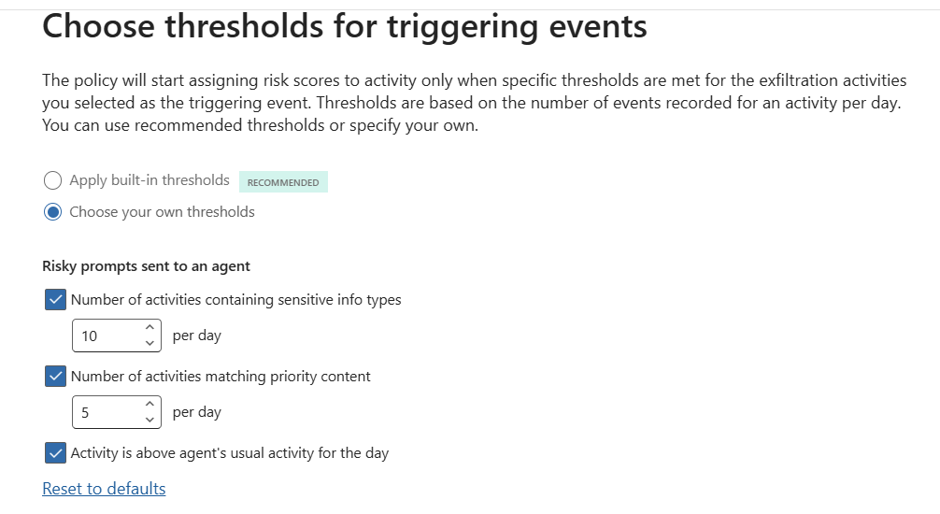
To mitigate this risk: Use both Purview Insider Risk Mnanagement and Purview Data Security Posture Managenent to create policies that specifically looks for risky AI usage.
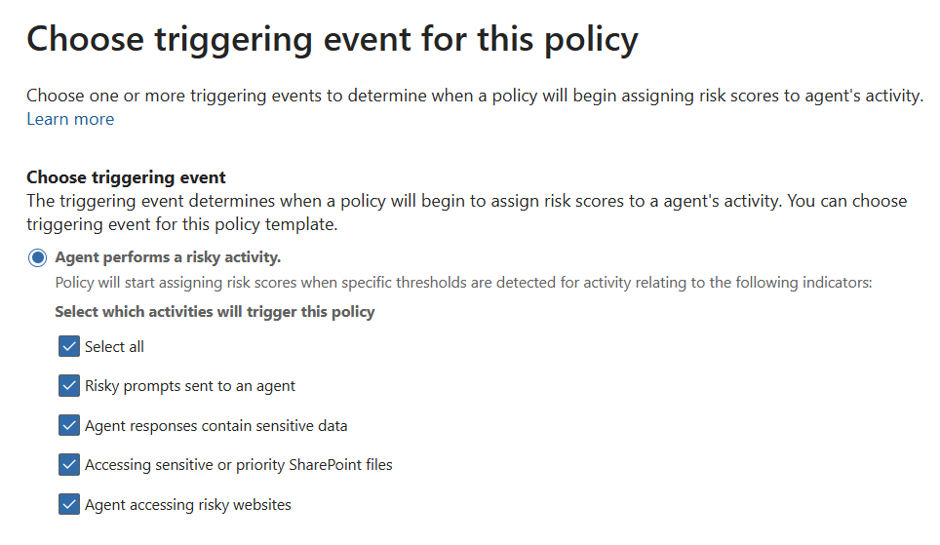
Similar to you basic policies, you can create thresholds to identify false positives to true positives.
Conclusion: Starting Small, Thinking Big

Don’t try to boil the ocean. Start with a pilot group (e.g., M&A or Finance). Insider Risk Management is a journey of cultural and technical maturity.

It’s about building a resilient organisation where data is respected, privacy is protected, and risk is managed collaboratively.
A Practical Guide to Insider Risk Management in the UK

There are many, many post talking about Insider Risk Management but very little that talks about the practical, realistic and field tested approach to Insider Risk Management. This is my attempt to tip the scale towards the latter. I’m skipping the textbook definitions to share real-world scenarios from the trenches specifically, the messy, human problems clients have thrown at me and the practical, field-tested responses we’ve workshopped to address them.

Let’s start with the Human and the strategic foundations of Insider Risk which is…

The Human Element

Let’s be honest: we’ve built digital fortresses with firewalls taller than the Shard and MFA that demands a blood sample. But what happens when the threat isn’t a hooded hacker, but friendly Dave from Sales “backing up” his client list before jumping ship?

In the UK, 90% of organisations face insider incidents annually, and 74% are negligent. People like Dave who aren’t villains, just human [Source: Cybersecurity Insiders]. IRM isn’t about building higher walls; it’s about understanding who’s walking through the gate. With the FCA and GDPR watching closely, “set and forget” security will no longer work.

IRM is a Team Sport

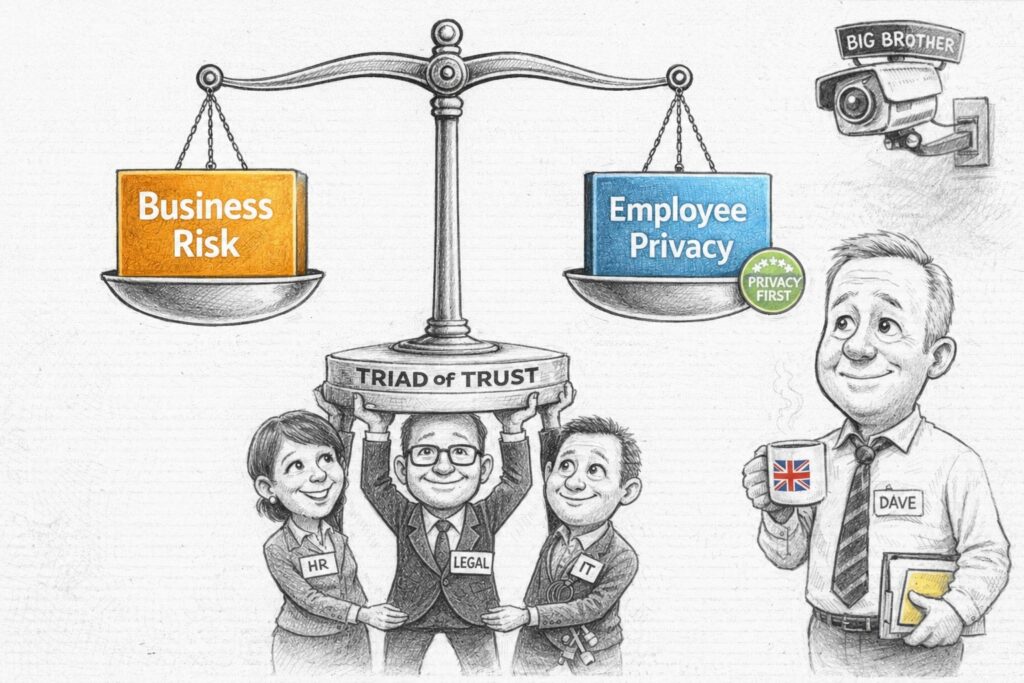
If you think IRM is just a “Cyber Security thing,” you’re in for a rude awakening. It’s more like a heist movie, but instead of stealing diamonds, you’re trying to stop data from walking out the door. And you can’t do it alone. You need a “Triad of Trust” (there’s 4 below since I’ve not used Triad before):

  • HR: They’re the ones who know Dave is leaving. They provide the context—resignations, performance reviews, the “vibes.” Without HR, you’re just watching random data movements and guessing.
  • Legal: They’re the ones who keep you out of court. They ensure your monitoring doesn’t cross the line into “Big Brother” territory, keeping you compliant with employment law, Privacy laws and GDPR.
  • IT/Cyber: You. The tech wizards. You provide the tools (Purview, DLP, Logging) and the forensic skills to figure out what’s actually happening.
  • Business Leaders: They define what “sensitive” actually means. From M&A docs, merger docs; to Customer Support, it’s the client list. One size does not fit all.

Pro Tip: Form a small, cross-functional steering group. Call it the “Data Defence League” if you want. Just get them in a room.

The Privacy Paradox (aka Balancing Monitoring with Trust)

Let’s address the elephant in the room: IRM tools are intrusive by design. They’re supposed to be. They monitor user activity and correlate events to spot patterns. But in the UK, we have a thing called “privacy,” and it’s kind of a big deal. Here’s how you can balance it.

The UK – GDPR Balance:

  • Transparency: Tell people you’re watching. Update those employment contracts. Add it to your Employee Training program, include it your End-user Agreement that they see when they log-in to their Corporate PC. Send an email. Be open. Why: Because secrecy breeds mistrust.
  • Proportionality: Don’t monitor the intern with the same intensity as the Head of M&A. Start with high-risk roles (Tier 1) and expand based on evidence. It’s called “being reasonable.”
  • Pseudonymisation: This is your best friend. Purview keeps data private by default. Analysts see “ANON2340,” not “Dave from HR,” until a formal case is opened. It’s like a mask for your data.
  • Policy-Led Monitoring: Only trigger monitoring when a highly defined policy is breached. This isn’t about general surveillance; it’s about catching specific, pre-agreed risk behaviors. If the policy isn’t broken, the system stays quiet.

You can’t protect what you haven’t classified

Here’s another hard truth. Purview IRM is only as good as the data it can see. If you haven’t done the boring work of classification, you’re flying blind. There’s a clear dependency chain:

  • Sensitivity Labels: The bedrock. If a document isn’t labelled “Confidential,” IRM can’t prioritise it. It’s like trying to find a needle in a haystack without knowing what a needle looks like.
  • Sensitive Information Types (SITs): Teach Purview to recognise UK-specific data like NINs, IBANs, or NHS numbers. If it doesn’t know what a NIN is, it can’t protect it.
  • Data Loss Prevention (DLP): DLP is the “first line of defence.” IRM is the “second line” that investigates when DLP is bypassed or when subtle patterns emerge. Think of DLP as the bouncer and IRM as the detective.

Warning: If your DLP policies are noisy or your labels are inconsistent, your IRM alerts will be useless. Start by tuning your DLP and Classification strategy before turning on IRM. Otherwise, you’ll just be drowning in false positives.


Questions from my clients HR, Legal and Business Operations team

Q1 (HR/Legal): “How do we ensure we aren’t creating a ‘Big Brother’ culture that destroys employee morale?”

Answer: Focus on “Privacy by Design.” Use pseudonymisation, limit access to investigation data to a need-to-know basis, and ensure all monitoring is tied to a legitimate business interest (e.g., protecting IP) rather than general performance monitoring. Transparency is your best defence against mistrust. Think of it as “security with respect.”

Q2 (Business Ops): “How do we distinguish between ‘normal’ high-volume work and ‘risky’ data exfiltration, especially in data-heavy roles like Legal or Finance?”

Answer: Use “Scoped Policies” and “Baseline Behaviour.” Purview allows you to set different thresholds for different groups. A Legal team downloading 500 files for a DSAR is normal; a Sales rep doing the same is a risk. Use group-based scoping to reduce false positives and respect business context. It’s about context, not just volume.

Q3 (Legal/Compliance): “What are the legal repercussions for a first-time offender versus a repeat offender?”

Answer: Define a “Graduated Response” framework. First-time negligent offenses should trigger coaching and re-training. Repeat offenses or malicious intent should trigger formal HR/Legal escalation. Consistency is key to procedural fairness. Don’t fire Dave for a first-time mistake; teach him.

Q4 (IT/Security): “How do we handle long notice periods (e.g., 3-6 months) for senior leavers?”

Answer: Map AD “accountExpires” attributes to IRM triggering events. Configure a 90-day pre-expiry monitoring window to catch pre-resignation data gathering. It’s like having a security camera on the exit door.

Q5 (HR): “How do we integrate IRM with our existing HR processes for terminations?”

Answer: Use HR connectors to automatically flag resignations or terminations. This ensures IRM policies are triggered without manual intervention, reducing the risk of human error. Automate the boring stuff.

Q6 (Business Leaders): “How do we measure the success of our IRM programme?”

Answer: Track metrics like “Mean Time to Investigate,” “False Positive Rate,” and “Number of High-Severity Cases Resolved.” The goal is to move from reaction to resilience. Show them the value, not just the alerts.

Protecting Your Data from Geopolitical Threats: A Practical DLP guide.

Here’s how you can use Microsoft Purview’s Data Loss Prevention (DLP) policies to safeguard your information from unauthorised access today.


Important:

As a best practice, always conduct a business impact assessment first. Doing activities 1 and 2 can disrupt legitimate business operations. Ask yourself:

  • Do we have suppliers, partners, or customers in these regions?
  • Are there ongoing projects requiring data exchange that will go to this region?
  • Could this affect our global workforce or remote employees?

1. Block Risky IP Addresses

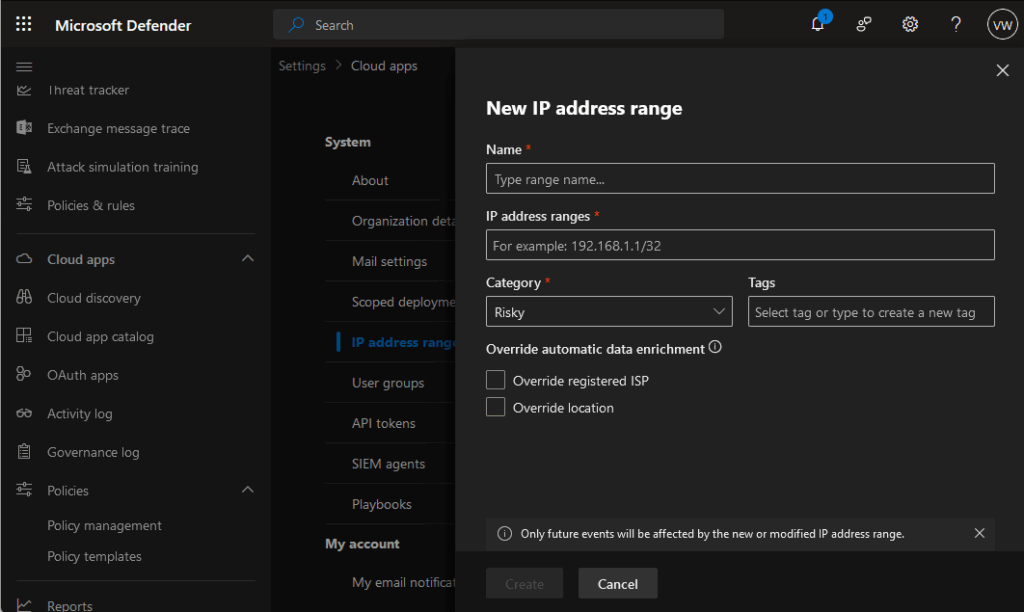
Start by implementing IP-based restrictions in your DLP policies. Block known IP addresses from high-risk countries to prevent data exfiltration attempts. This creates your first line of defence against unauthorised access from these regions.

You can do this through Defender for Cloud apps: https://learn.microsoft.com/en-us/defender-cloud-apps/ip-tags

2. Restrict File Sharing to Risky Platforms

Many data breaches happen through seemingly innocent file sharing. Block access to popular file-sharing services hosted in these regions:

Here’s a few popular mail and file sharing sites for the 2 countries mentioned in the Microsoft Security Program post.

Russian platforms:

• Yandex.Disk (https://360.yandex.com/disk/)

• Mail.ru Cloud (https://mail.ru/)

Chinese platforms:

• Baidu Pan (https://pan.baidu.com/)

• Tencent Weiyun (https://www.weiyun.com/)

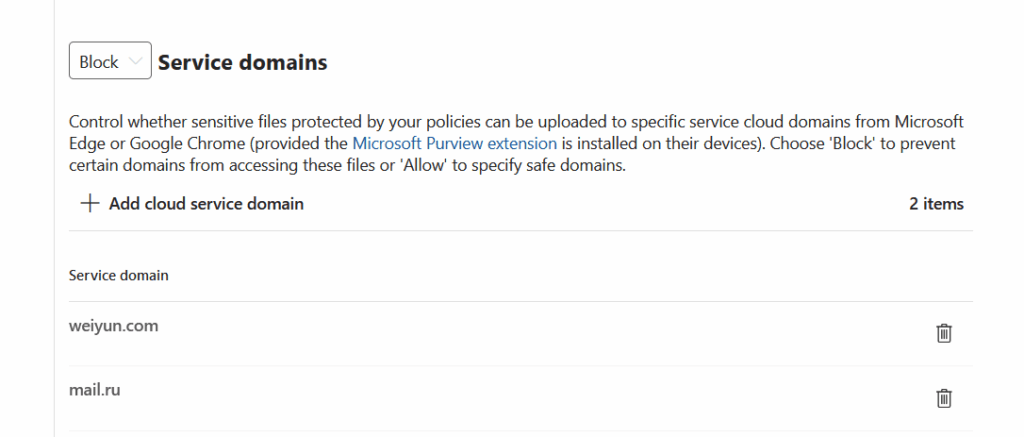
Configure your DLP policies to detect and block uploads to these services automatically.

You can also create a policy to block uploads to a group of domains, so that end-user will NOT be able to uploaded sensitive data through their devices. The can be configured for Purview Endpoint DLP.

3. Monitor Email Communications

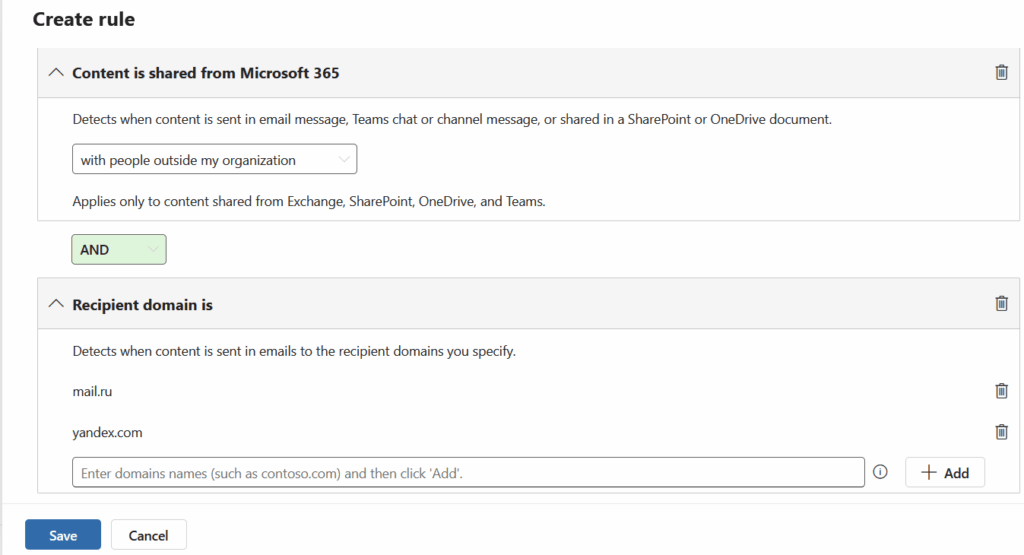
Email remains a primary vector for data theft. Block or monitor communications with popular email services from these regions, including Yandex.Mail, Mail.ru, QQ Mail, and 163.com. Your DLP policies can flag or prevent sensitive data from being sent to these domains.

4. Track Your Data’s Journey

Use Purview Information Protection’s Track and Trace feature to maintain visibility over your sensitive documents. This powerful tool shows you:

• Who’s accessing your protected files

• Where they’re being opened

• When access attempts occur

It’s like having a GPS tracker for your most valuable data.

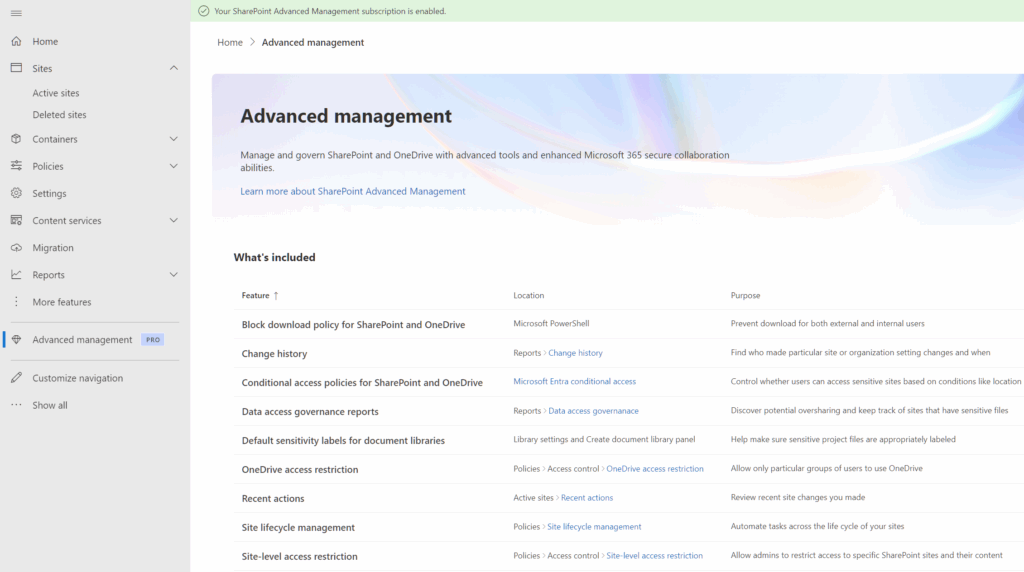
5. Regular Health Checks with SharePoint Advanced Management

Don’t set and forget. Use SharePoint Advanced Management to regularly review:

• Which files are being shared externally

• Who has access to sensitive documents

• Unusual sharing patterns that might indicate compromise.

Think of it as your monthly data health check-up.

Read up on how SharePoint Advance management works here: https://learn.microsoft.com/en-us/sharepoint/advanced-management


Additional tips:

Tip 1 : Start with monitoring and alerting rather than outright blocking. This lets you understand your data flows before implementing restrictions. You can always tighten controls once you’ve mapped legitimate business needs.

Tip 2: Consider creating exceptions for specific, verified business partners rather than blanket country blocks. This gives you granular control whilst maintaining necessary business relationships.

Remember, technology is only as strong as the people using it. Train your team to recognise suspicious requests and understand why these protections matter.

When to use Purview Information Barriers and Purview DLP

At first glance, it’s easy to think that if you have Data Loss Prevention (DLP) capabilities where you have policies monitoring internal data flows, then Information Barriers might be an unnecessary extra. After all, DLP diligently scans every email, document, and chat for sensitive content. This is certainly the sentiment that I often get when talking to Cyber Security teams.

This made me realise 2 things:

  • Microsoft needs to do a better job in marketing/ promoting Purview Information Barriers and
  • Information Barrier has it’s own purpose that DLP cannot do.

What is Purview Information Barrier

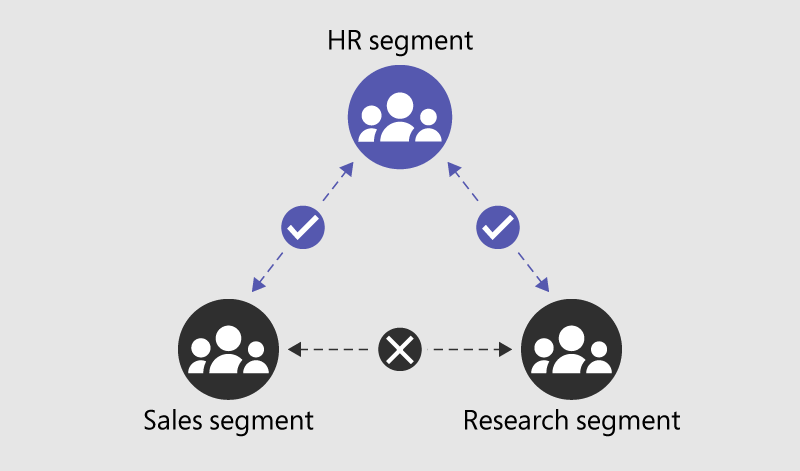
Microsoft Purview Information Barrier is designed to restrict communication and collaboration between defined groups within an organisation. It’s primary function is to ensure that teams with conflicting interests (think of trading and research groups in financial services) cannot interact with each other. By enforcing internal boundaries, these policies help maintain confidentiality and avoid accidental data leakage between sensitive departments. (ex. Insider Trading)

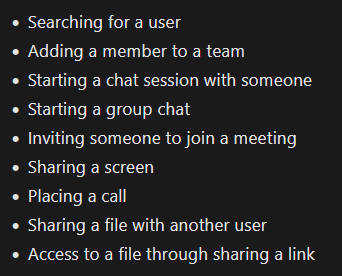
With Purview Information Barrier, you can create a policies that can automatically prevent internal teams from communicating with each other through Microsoft teams. These include the following actions:

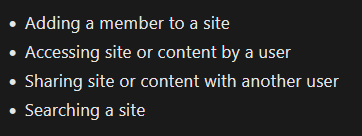
In SharePoint and OneDrive, Information Barriers can prevent the following unauthorized collaboration:

Capabilities shared by Information Barrier in Microsoft Purview DLP

You probably noticed that the activities above such as “Sharing a file with another” and “Sharing content with another user” can already be done within Microsoft Purview DLP. In essence, yes, that is correct. An admin can setup a policy to BLOCK these file sharing to another user.

Where DLP falls short and Information Barriers shine

While Purview DLP is effective at blocking explicit sending or sharing actions, it misses scenarios where access is already granted, which is where Purview Information Barriers come in to the rescue. DLP policies activate when a user actively sends data, but if sensitive information is already shared through granted permissions, the DLP policy remains dormant. For example, if User A (Finance) adds User B (Sales) as a member to the Finance Teams site or SharePoint site, User B gains immediate access to all files without any explicit sharing event, leaving DLP unable to intervene.

Alternatively, User A could simply send a meeting invite and start a Teams call with screen sharing, bypassing the trigger for DLP.

Another example, consider a situation where User A uploads a confidential document to a shared folder that automatically grants access to a broader group—here, Information Barriers would prevent unauthorised viewing by restricting access at the source, whereas DLP would not block the document being placed in that shared location.

Strategy in using BOTH Information Barrier and DLP

You should view Purview Information Barriers as a key part of your data governance and protection strategy. Relying solely on DLP leaves gaps that Information Barriers can fill—by preventing risky internal interactions before they even happen. Here’s a few actionable items that you can do today:

  • Start by reviewing your organisation’s internal communication flows to identify potential conflicts of interest and assign segmented rules that restrict who can communicate with whom.
  • Work with your Corporate Communications, Human Resources teams and Legal team to identify when and where to apply restrictions between groups of users.
  • Ensure these barriers align with your overall compliance and governance framework, and conduct regular testing to confirm their effectiveness. Then codify these in your data governance policies
  • Finally, train your teams on why these measures are necessary and how to adhere to them.

Adopting a dual strategy with both DLP and Information Barriers will provide much stronger data protection stance, reducing the chance of inadvertent data leaks from within.

References:

AI Implementation Failures: What We Learned from 2024

My news feed is filled with “A Year in Review” of what happened in 2024 and the thing that stood out to me was 2024 was a bit of a mess for AI implementations.

From chat-bots giving illegal advice to fake content flooding our news and social media feeds (I’m pretty sure that I’m not the only ones who’ve seen the Pope wear a cool puffy jacket)

So how did we get here:

The rush to implement AI solutions was largely driven by market pressure and FOMO (Fear of Missing Out). Companies, desperate to stay competitive, rushed to deploy AI solutions without proper governance frameworks or security controls. Board rooms worldwide echoed with demands for “AI strategy,” often without understanding what that actually meant for their business.

This perfect storm was further fueled by the accessibility of AI tools and platforms. What used to require deep technical expertise became available through simple APIs and low-code interfaces. While this democratisation of AI is generally positive, it led to a “wild west” scenario where implementations often outpaced proper security and compliance considerations.

The result? Poor deployment, Terrible user experience and many half-baked AI solutions, security vulnerabilities, and trust issues.


Before You Start: The Boring (But Essential) Bits

Look, I get it – you want to jump straight into the exciting world of AI. But here’s the thing: you need to sort out your data house first. Think of it like baby-proofing your home. Your CISO and security team need to know exactly what data you’ve got, where it lives, and who’s allowed to play with it.

Get your Microsoft Purview DLP policies sorted, tag your sensitive stuff using Purview Information Protection, and make sure you’ve got the right security controls in place. Trust me, this boring bit will save you from some proper headaches later.


The Fix: Four Simple Actionable Steps

  1. Sort Out Your Governance
    • Get an AI committee going
    • Write clear policies on AI usage, Data Protection, etc
    • Set proper standards
    • Actually check if things work (please audit!)
  2. Lock Down Security
  3. Quality Control
    • Keep humans in the loop
    • Test, test, test
    • Watch those outputs (again please run audit checks)
    • Clean data = better results
  4. Smart Implementation
    • Start small, scale later (even on a controlled Copilot for Microsoft 365, pilot it first with a handful of trusted people)
    • Train your people properly, (end-user education is a must)
    • Listen to user feedback
    • Don’t rush it

2024 showed us that rushing in without proper planning is a recipe for disaster. Take your time, do it right, and maybe we won’t see your company in next year’s “AI Fails” list.

Other Sources:

From Novice to Ninja: a new CISOs guide to DLP

Congratulations, CISO! 🎉 Great job in landing your new role, where protecting sensitive data isn’t just a job—it’s a daily tightrope walk over a pit of cyber threats, compliance demands, and evolving technology.

Now that you’re at the steering wheel, your inbox is probably overflowing with security concerns, regulatory requirements, and a few “fun” audit emails. Don’t worry, you’re in good company. This guide is here to give you actionable steps to set up your Data Loss Prevention (DLP) strategy, ensuring you don’t just survive in this role—you thrive.

So, what does being a CISO mean? Well, you’re now the go-to person when sensitive data sneaks out, malicious insiders get a bit too curious, or someone clicks that suspicious link promising free money from an unknown relative in Timbuktu. No pressure, right? But here’s the deal: inaction is risk. Delaying or overlooking the core elements of a solid DLP strategy could lead to breaches that cost more than your next cybersecurity budget.

To make your journey smoother, I’ve prepared a handy worksheet that you can use right now to take action on your Data Loss Prevention strategy. These aren’t just checkboxes—these are critical steps to lock down your organization’s data and avoid waking up to a breach nightmare.

You can Download the worksheet below.

Here’s what you can expect see inside:

1. Classifying Data and Why It’s Important

Why it matters: Not all data is created equal. By classifying your data, you can prioritize resources and security measures where they’re needed most. Would you protect the company picnic plan with the same force as your customers’ financial information? (Spoiler: probably not!)

Example:

  • High-risk data: Customer credit card details, proprietary code, or confidential HR files—things you’d never want to see in the wrong hands.
  • Medium-risk data: Internal meeting notes, marketing strategies—sensitive, but not catastrophic if leaked.
  • Low-risk data: Public reports, customer FAQs—this is the stuff you’d share at a conference.

Take Action Today: Review your organization’s data and start tagging it by risk level. Ask yourself, “What would happen if this data got out?” and use that to guide your classification efforts

2. Why and How to Identify Sensitive Data

Why it matters: You can’t protect what you don’t know exists. Sensitive data is often hidden across different platforms—sometimes even in the most unexpected places (like a random email attachment or NTFS file shares). Identifying it is the first step to ensuring it stays secure.

Example:

  • Sensitive Data: Personally Identifiable Information (PII) like social security numbers or health records, intellectual property (IP), and anything that’s subject to regulations like GDPR or HIPAA.
  • Surprise Discovery: Finding a list of client emails attached to a forgotten project buried in a shared folder.

Take Action Today: Use a discovery tool or audit your data manually. Start with cloud storage, email servers, and shared folders. Look for data that could lead to a privacy violation or financial loss if exposed.

3. Developing a Data Handling Policy

Why it matters: A solid data handling policy is the foundation of your DLP strategy. Without clear rules in place, sensitive information can slip through the cracks, exposing your organization to unnecessary risk. Your data handling policy ensures everyone—from top execs to interns—understands the dos and don’ts of handling sensitive information.

Example:

  • Clear Guidelines: For high-risk data like financial information, the policy might mandate encryption during transfer and restricted access to authorized personnel only.
  • Real-Life Scenario: Imagine your marketing team accidentally sharing a file with customer details over an unsecured network. A proper data handling policy would prevent this by enforcing secure file transfer practices.

Take Action Today: Draft a policy that covers how different types of data (high, medium, low risk) should be handled. It should specify everything from encryption requirements to access control and data retention periods. Involve key stakeholders (Legal, IT, HR) to ensure all bases are covered.

Now that you know the key steps to securing your organization’s data, it’s time to plan it out, partner with your internal stakeholders, and take action. DLP isn’t a one-person job—it’s a team effort that involves collaboration across IT, Legal, HR, and beyond. The risks of inaction are far too high, so don’t wait until something goes wrong. Proactively implementing these best practices today will not only protect your data but also strengthen your leadership as a new CISO.