Protecting Your Data from Geopolitical Threats: A Practical DLP guide.

Here’s how you can use Microsoft Purview’s Data Loss Prevention (DLP) policies to safeguard your information from unauthorised access today.


Important:

As a best practice, always conduct a business impact assessment first. Doing activities 1 and 2 can disrupt legitimate business operations. Ask yourself:

  • Do we have suppliers, partners, or customers in these regions?
  • Are there ongoing projects requiring data exchange that will go to this region?
  • Could this affect our global workforce or remote employees?

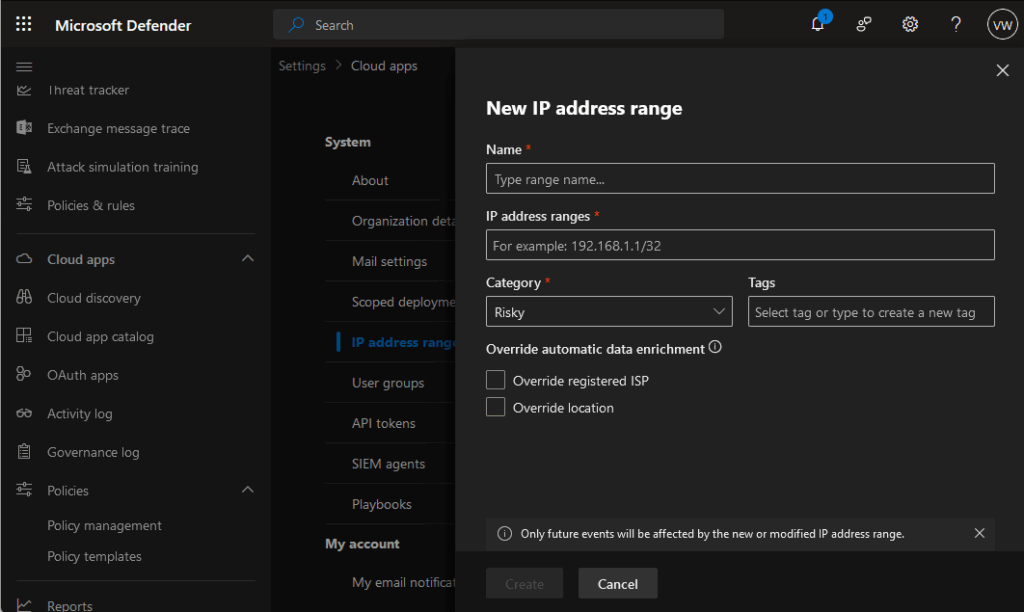
1. Block Risky IP Addresses

Start by implementing IP-based restrictions in your DLP policies. Block known IP addresses from high-risk countries to prevent data exfiltration attempts. This creates your first line of defence against unauthorised access from these regions.

You can do this through Defender for Cloud apps: https://learn.microsoft.com/en-us/defender-cloud-apps/ip-tags
2. Restrict File Sharing to Risky Platforms

Many data breaches happen through seemingly innocent file sharing. Block access to popular file-sharing services hosted in these regions:

Here’s a few popular mail and file sharing sites for the 2 countries mentioned in the Microsoft Security Program post.

Russian platforms:

• Yandex.Disk (https://360.yandex.com/disk/)

• Mail.ru Cloud (https://mail.ru/)

Chinese platforms:

• Baidu Pan (https://pan.baidu.com/)

• Tencent Weiyun (https://www.weiyun.com/)

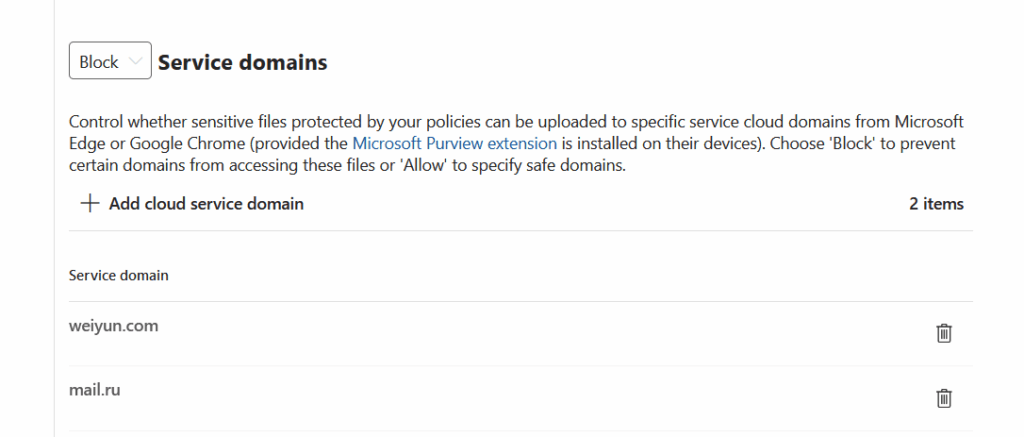
Configure your DLP policies to detect and block uploads to these services automatically.
You can also create a policy to block uploads to a group of domains, so that end-user will NOT be able to uploaded sensitive data through their devices. The can be configured for Purview Endpoint DLP.
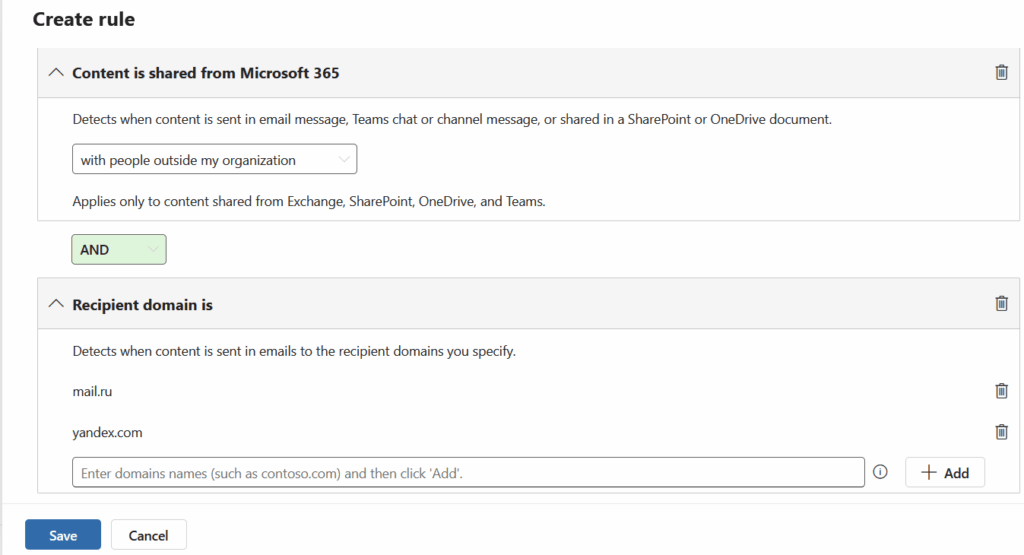
3. Monitor Email Communications

Email remains a primary vector for data theft. Block or monitor communications with popular email services from these regions, including Yandex.Mail, Mail.ru, QQ Mail, and 163.com. Your DLP policies can flag or prevent sensitive data from being sent to these domains.

4. Track Your Data’s Journey

Use Purview Information Protection’s Track and Trace feature to maintain visibility over your sensitive documents. This powerful tool shows you:

• Who’s accessing your protected files

• Where they’re being opened

• When access attempts occur

It’s like having a GPS tracker for your most valuable data.

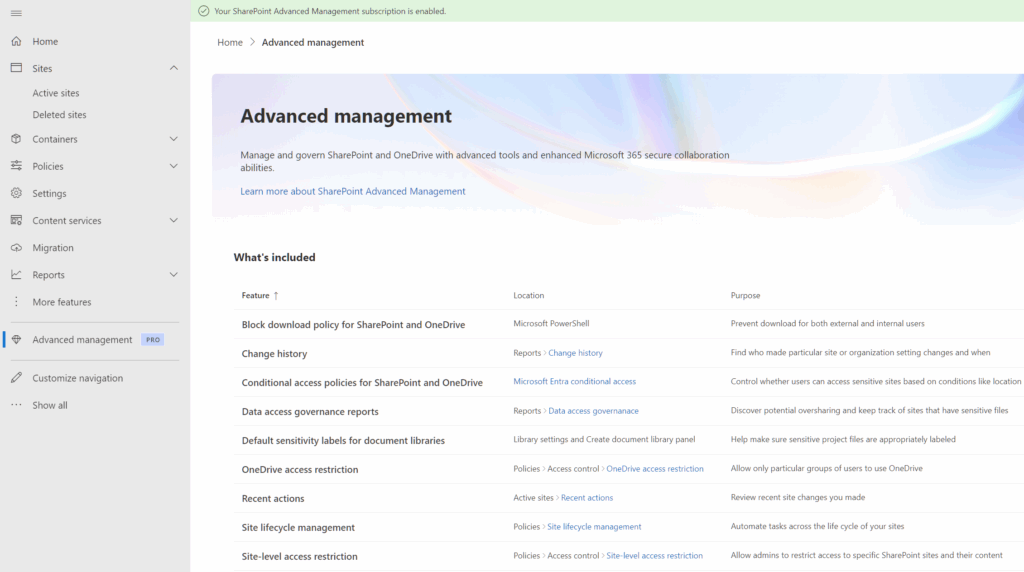
5. Regular Health Checks with SharePoint Advanced Management

Don’t set and forget. Use SharePoint Advanced Management to regularly review:

• Which files are being shared externally

• Who has access to sensitive documents

• Unusual sharing patterns that might indicate compromise.

Think of it as your monthly data health check-up.

Read up on how SharePoint Advance management works here: https://learn.microsoft.com/en-us/sharepoint/advanced-management

Additional tips:

Tip 1 : Start with monitoring and alerting rather than outright blocking. This lets you understand your data flows before implementing restrictions. You can always tighten controls once you’ve mapped legitimate business needs.

Tip 2: Consider creating exceptions for specific, verified business partners rather than blanket country blocks. This gives you granular control whilst maintaining necessary business relationships.

Remember, technology is only as strong as the people using it. Train your team to recognise suspicious requests and understand why these protections matter.
Using eReaders with Microsoft Purview Information Protection: A “Remarkable” Case Study

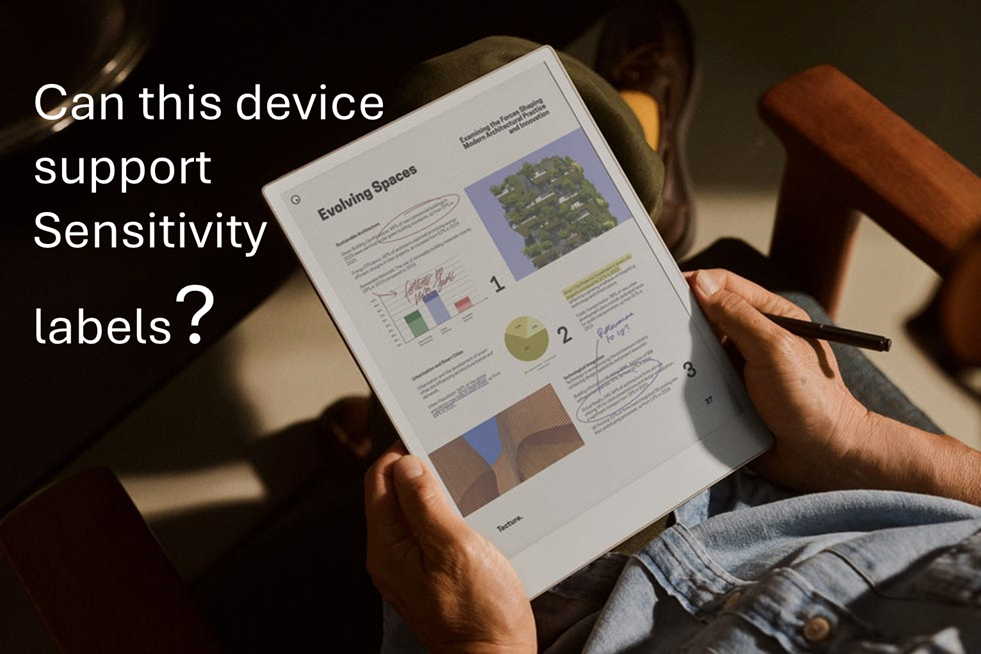
I’ve already decided what I’ll buy first when I win the lottery and it’s going to be the Remarkable Paper Pro.

I saw a C-level executive from a client using this device in a meeting and I was immediately impressed by its design. The form factor, the way it writes like paper and the feature where you can just write on-top of a PDF files is just so cool.

This same client later asked whether implementing sensitivity labelling for PDF files would impact their users as they have many of whom use this device for reading and annotating documents whilst travelling (especially VIPs). So…I decided to investigate.

Remarkable Paper Pro: Technical Overview

  • Operating System: Codex (custom Linux-based OS)
  • Supported formats: Limited to PDF and ePub
  • Web capabilities: No built-in browser

File Management Options

  • Email: Direct file sharing via email.
  • Cable transfer: USB connection for importing/exporting
  • Cloud integration: Syncs with personal Google Drive, Dropbox and OneDrive
  • Remarkable custom app: The device can import files through my.remarkable.com

Device limitation (for Device Management or Data Security)

  • The Operating system (a Linux OS) cannot be onboarded to Microsoft Device Management or Intune
  • The Operating system does not have browser to access the Microsoft authentication portal
  • Users accessing corporate data are limited to do it in 3 general ways (sending it to the device via email, via usb cable, or via syncing the files from their Personal online storage aka Personal Dropbox, OneDrive, Google Drive)
  • Though reMarkable tablet can open, view, and annotate password-protected PDFs. However, this feature is limited to basic password protection and does not extend to Microsoft Purview’s advanced encryption methods, such as Rights Management Services (RMS) or Microsoft Information Protection (MIP).

Users will encounter issues only when using sensitivity labels with encryption to PDF files. This limitation exists because the Remarkable devices cannot process Microsoft Purview’s advanced encryption methods, lacking both the necessary authentication capabilities and OS support to decrypt protected content.

The device also has no browser to authenticate with Microsoft services and its custom Linux-based OS (Codex) cannot be integrated with Microsoft’s security ecosystem. This makes it not possible to work on encrypted PDFs.

However, if PDF files are merely labelled without encryption applied (visual marking only), users will experience no impact whatsoever. These files remain fully accessible and maintain all annotation capabilities, as the labelling exists purely as metadata without affecting the file’s core accessibility.

Potential Solutions

Simple approach: Instruct executives to use sensitivity labels without encryption for PDF files they need to access on their Remarkable devices. Implement DLP monitoring to track PDFs sent to personal email addresses, providing security oversight without disrupting workflow.

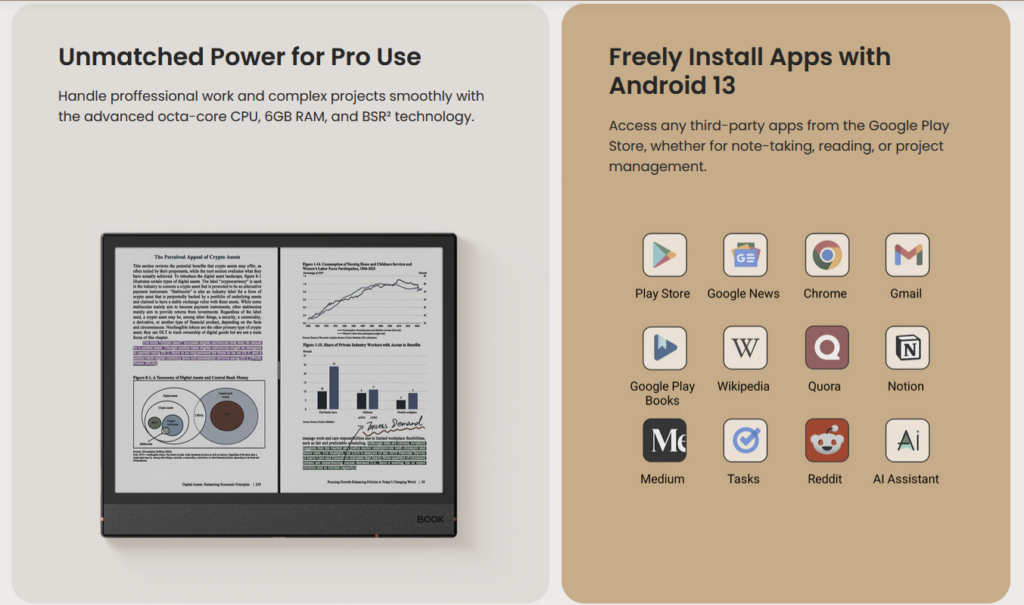
Moderate approach (but Costly): Issue corporate Onyx Boox eReaders as an alternative. Onyx Boox is a direct competitor of Remarkable but the key difference is that it runs on Android OS.

The big benefit: these Android-based (Android 13 OS) devices support Microsoft authentication and can be properly integrated with MDM solutions, allowing full compatibility with encrypted documents.

It also cost less than the Remarkable Paper Pro, but buying an extra corporate device (even at $499 USD) just for reading PDF files and note taking might not be taken well by your CFO.

Complex approach: Create a special sensitivity label variant without encryption specifically for executive use cases involving eReaders. This label would maintain visual markings and tracking capabilities while ensuring accessibility on the Remarkable device.

Supporting your current Remarkable device users today.

If supporting Remarkable devices for VIP users is necessary, focus on monitoring data flow rather than blocking device use.

Set up DLP policies that track document transfers to personal emails and cloud services used with Remarkable. Include:

  • Alerts when sensitive documents are transferred
  • Required business justification for transfers
  • Time limits on sensitive document access
  • Targeted security training for Remarkable users
  • Regular reviews of transferred documents
  • Clear audit logs of document movement (once reviews are done)

This approach balances users device preferences with security needs. Monitoring works better than banning devices that senior staff prefer to use.


Reference:

Embrace Change, Secure Data: Navigating the UK’s Data Protection Evolution with Microsoft Purview

UK’s Data Protection Refresh

The UK is introducing a new law that plans to introduce a host of new updates to the existing UK Data Protetion bill. You can read details of the change here and here and from the UK government source themselves here.

The UK Data Protection and Digital Information Bill proposes a transformative approach to data protection, aiming to balance innovation with data security. The bill introduces easier data transfer processes, a risk-based approach to international transfers, and a streamlined accountability framework. This legislative evolution represents the UK’s commitment to fostering a secure yet flexible data-driven landscape post-Brexit.

To kickstart your journey towards embracing the changes, I encourage your organization to consider initiating with these key steps. This approach not only prepares you for the transition but also positions you to leverage change using proven tools that are purpose built for Security and Compliance.

Microsoft Purview: Your Data Protection Ally
Microsoft Purview is a comprehensive toolkit designed to help organizations navigate the complexities of the new data protection landscape. Here’s how:

  1. Simplified Data Transfers: With Microsoft Purview Information Protection, organizations can classify, label, and protect data, ensuring compliance with the bill’s simplified data transfer requirements.
  2. Streamlined Accountability in Action: Microsoft Priva adapts to the bill’s accountability revamp, offering privacy management solutions that align with the shift towards a “senior responsible individual” model.
  3. Legitimate Interests Simplified: The platform aids in discerning when and how to process data based on legitimate interests, reflecting the bill’s nuanced take on data processing rights.
  4. Embracing a Risk-Based Approach: Microsoft Purview Data Loss Prevention (DLP) fortifies organizations against data breaches, embodying the bill’s risk-based ethos for international data transfers.

The Takeaway: Future-Proof Your Data Practices
The UK’s legislative update signals a new era of data protection, where flexibility and security go hand in hand. Microsoft Purview stands out as a the go-to resource for organizations aiming to thrive in this changing regulatory environment. By leveraging Purview’s suite of solutions, businesses can ensure their data practices are not only compliant but also conducive to growth and innovation in the digital age.

Dive Deeper:
For those keen to explore the intricacies of the UK Data Protection and Digital Information Bill and Microsoft Purview’s capabilities further, insightful resources await at IAPP’s overview and Pinsent Masons’ detailed analysis here.