Meet Your Newest Insider Threat.

It Doesn’t Have a Leaving Date. It Doesn’t Sleep. And It Has Access to Everything.


Let me introduce you to Dave.

Dave from Compliance is lovely. He’s leaving next Friday, he’s just retired, and he’s just discovered he can sync his entire OneDrive to his personal laptop. Dave isn’t doing this maliciously. He’s just a human with a deeply misguided sense of which files are ‘his’.

Now meet Dave’s replacement. No notice period. No offboarding checklist. No HR signal. It’s an AI agent ….and it’s already inside your environment, reading files, summarising documents, and traversing your SharePoint sites at machine speed. The agent doesn’t mean any harm. But if your data estate is a digital junk drawer with no labels, no classification, and no DLP, it doesn’t need to.

The Insider Risk Problem Just Got a Lot More Complicated

Insider risk has always been a human behaviour problem. The firewall was never the issue. It was always the person on the other side of it. But the conversation has shifted. Dramatically.

The Gurucul 2026 Insider Risk Report, produced in partnership with Cybersecurity Insiders, reports that 94% of organisations say AI adoption is increasing their insider risk exposure, 74% describe that increase as moderate or significant, and 90% experienced at least one insider incident in the past 12 months. These are not niche concerns. That is the entire market sweating through its shirts.

For UK financial services firms, the stakes are even higher. The FCA’s PS26/2 rules on operational resilience set incident reporting deadlines that begin in 18 March 2027, which means that ‘we did not know’ is no longer a defensible position. An Insider Risk Management programme is not a nice-to-have. It is a regulatory expectation wearing a cybersecurity badge.

Enter the Digital Insider

Risky AI usage is no longer limited to someone pasting a sensitive paragraph into a chatbot. The bigger shift is that AI is becoming part of day-to-day business operation. With Copilots, custom agents, and autonomous workflows can now retrieve files, reason across multiple sources, generate summaries from sensitive material, and in some cases take action on a user’s behalf.

Experts describe agentic AI as a new class of ‘digital insider’. Gartner predicts that 40% of enterprise applications will integrate task-specific AI agents by the end of 2026, up from less than 5% today. These agents are not malicious. But they are privileged, persistent, and capable of operating at machine speed. All without a leaving date, a notice period, or a natural sense of ‘I probably shouldn’t be reading this.’

The Microsoft Security Blog cites Microsoft Data Security Index findings that 84% of organisations want greater confidence in managing data input into AI applications, while 78% of users admit to bringing their own AI tools to work. The risk is not theoretical. It is already in your environment.

What Makes Agentic AI Different from Dave

A traditional user might search for one document at a time, open a small set of files, and manually decide what to do next. An agent does something very different.

  • It can query SharePoint sites, Teams content, emails, and repositories in rapid sequence.
  • It can pull fragments from many locations and assemble a high-value answer from data that was never intended to be viewed together.
  • It can surface confidential project plans, customer records, financial forecasts, source code, and credentials stored in long-forgotten collaboration spaces.
  • Security researchers have shown that prompting and retrieval patterns can be abused to turn AI assistants into reconnaissance tools – asking them to identify where passwords, keys, legal terms, or commercially valuable information may exist
    • This is something I’ve tried in multiple clients, a simple search by Copilot to look for documents with the words passwords (these are documents that are shared using ‘People in the Organisation’ option showed a handful of documents in .xlsx and some even in .docx format).

The risk expands further with computer-use style capabilities. Microsoft Copilot Studio’s computer use feature allows an agent to interact with web and desktop applications through a virtual mouse and keyboard. If a person can click through a finance app, enter data into a legacy system, or extract values from a browser session: an agent may be able to do the same. The desktop becomes another high-value discovery and potential exfiltration surface.
The key risk is shifting from simple data exposure to delegated authority. The real concern is not only whether AI can see sensitive data – but whether it can use that data inside connected workflows, across systems, and without the natural limitations of human judgement or working hours.

The Foundation You Cannot Skip

Before you can detect a Digital Insider — human or machine — you need to know what they are after. This is where most programmes collapse: they try to run IRM on top of a data estate that is basically a digital junk drawer.

The foundation is threefold, and none of it is optional:

1. Sensitivity Labels. Your data classification backbone. Without them, every file looks equally important — which means nothing is. In Microsoft Purview, labels like Public, Internal, Confidential, and Highly Confidential give you a taxonomy that both humans and automation can understand.

2. Sensitive Information Types (SITs). The pattern-matching engines that recognise credit card numbers, National Insurance numbers, bank account details, and custom regulatory identifiers. You cannot build DLP or IRM without tuned SITs.

3. Data Loss Prevention (DLP). Your first line of defence. It stops the easy mistakes — the accidental email to a personal account, the unsanctioned USB copy, the public SharePoint link. Crucially, DLP gives you the enforcement muscle before IRM gives you the investigative nuance.

If you do not have these three in place, your Insider Risk Management programme is just a very opinionated alerting system with no teeth.

An AI agent cannot respect a ‘Highly Confidential’ label if no such label exists. DLP cannot block exfiltration of customer data if DLP is not configured. And you cannot investigate anomalous agent behaviour if you have not defined what ‘anomalous’ means for a non-human actor.

Governing the Digital Insider with Microsoft Purview

The governance response has to be equally modern. Once your data foundation is in place, Microsoft Purview provides several layers specifically designed for the agentic AI era:

  • DSPM for AI: Discovers where AI is interacting with your data, identifies oversharing, and surfaces where sensitive information may be exposed to copilots and agents.
  • AI Observability: Extends visibility by showing how agents interact with files and data sources. Without this, you have a Digital Insider with no oversight.
  • DLP for AI Services: Controls what can be pasted, uploaded, or transferred to AI apps and unmanaged destinations. The built-in ‘Generative AI sites‘ group makes this straightforward to deploy.
  • Insider Risk Management (IRM): Adds behavioural context by correlating risky AI prompts, sensitive responses, exfiltration signals, and agent activity into a complete picture of risk.
  • Adaptive Protection — Dynamically adjusts DLP and device control policies based on the risk level of the user (or the agent). A high-risk agent session triggers stricter clipboard, print, and upload controls in real time.

Where to Start: A Practical Checklist

For practitioners, the message is clear. Treat agents as privileged actors, not just productivity features. Here is a practical starting point:

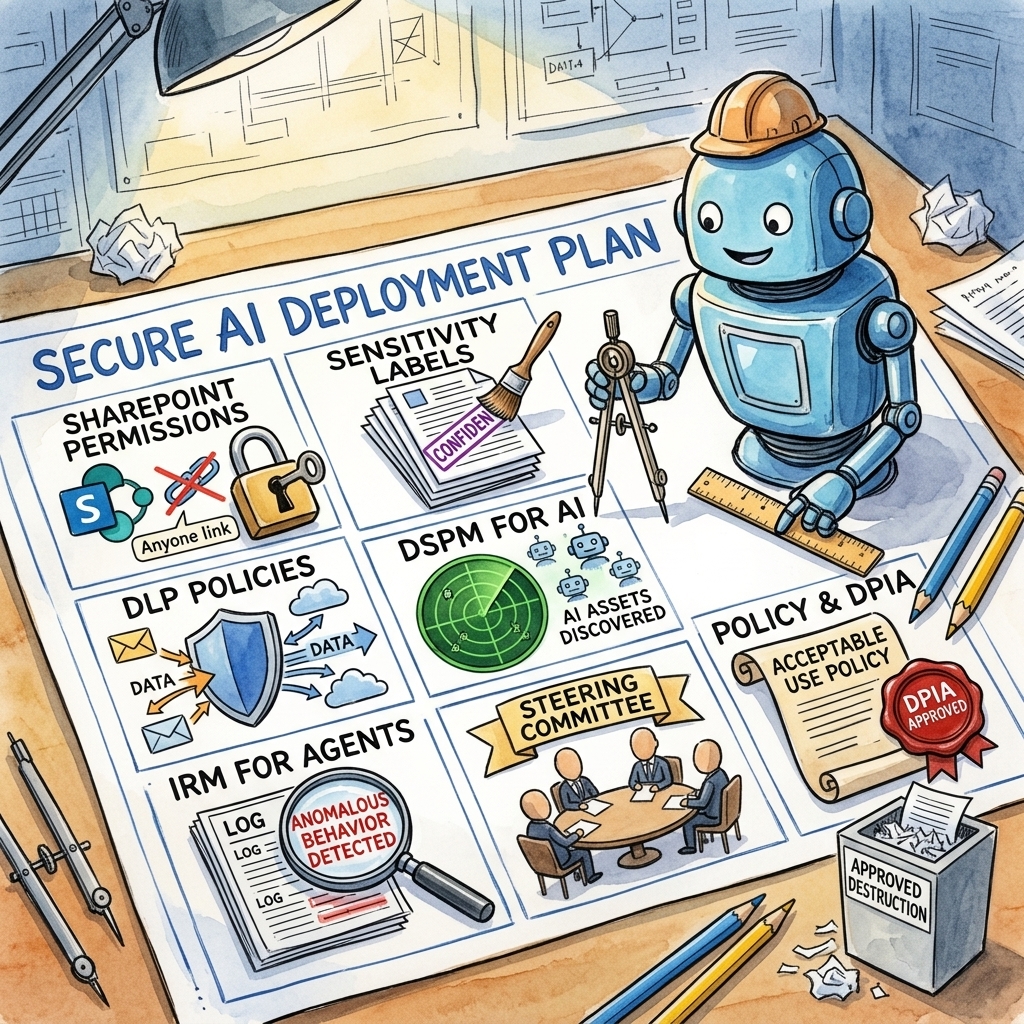
  • Reduce oversharing in SharePoint and other collaboration systems — tighten permissions and audit ‘Anyone’ and ‘Everyone at Organisation’ links.
  • Apply sensitivity labels across your data estate. Use auto-labelling and Trainable Classifiers to catch what manual labelling misses.
  • Deploy and tune DLP policies — covering endpoints, cloud apps, email, and generative AI interactions.
  • Enable DSPM for AI to discover which AI applications are connected to your environment and what data they can access.
  • Configure IRM for agents to detect anomalous behaviour — excessive data access, unusual file retrieval patterns, or attempts to interact with restricted repositories.
  • Build a cross-functional IRM steering committee. HR, Legal, IT, and Business Leaders all need a seat at the table.
  • Publish a clear Acceptable Use Policy and conduct a DPIA before deploying monitoring at scale.
The common Insider Risks and how to mitigate them

In Part 1 (read it here), we established the strategic and collaborative foundations of Insider Risk Management.

Now, we move to the practical hands-on application of IRM: how to detect and investigate the specific patterns of insider risk using Microsoft Purview. This section is for those who are ready to implement these controls.

Let’s look at the 4 common patterns (plus an extra special one about AI) that most organisations sees their employees do when they try taking data out of the organisation…whether they are intentional about it or not.

The Departing Employee risk

People sometimes take client lists, pricing files, or other company information when they are about to leave because they think it will help them in their next job. They may want to keep customer relationships, prove their value to a new employer, or make their move to a competitor easier and faster. Some also tell themselves that the information is “theirs” because they worked on it or built those client relationships.

In other cases, the reason is fear or frustration. A departing employee may worry that once they leave, they will lose access to important contacts, documents, or knowledge, so they copy it “just in case.” Even if they do not see themselves as doing something serious, taking company data before leaving can expose the organisation to legal, commercial, and security risk.

Insider Prevention tip: Use HR connectors to flag resignations. Configure a policy that monitors for unusual collecting/sharing 90 days pre-departure.

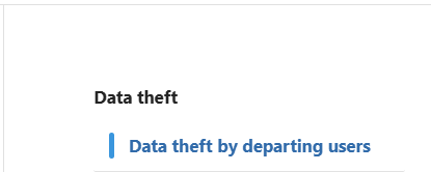
Inside Purview Insider Risk Management > Head to Policy then select the template Data theft by departing users. Then Select the HR connector configuration screen for Insider Risk Management. This is used to import resignation or employment status data for departing employee risk indicators.

Here’s the link on how to setup the connector: LINK

How to use these settings: Configure the HR connector to bring in employee status changes, such as resignations or planned departures. After the connector is active, map the relevant HR fields correctly and verify that departing users are being detected. You can then use this signal in an Insider Risk Management policy to increase scrutiny during the pre-departure window.

The Email to self risk

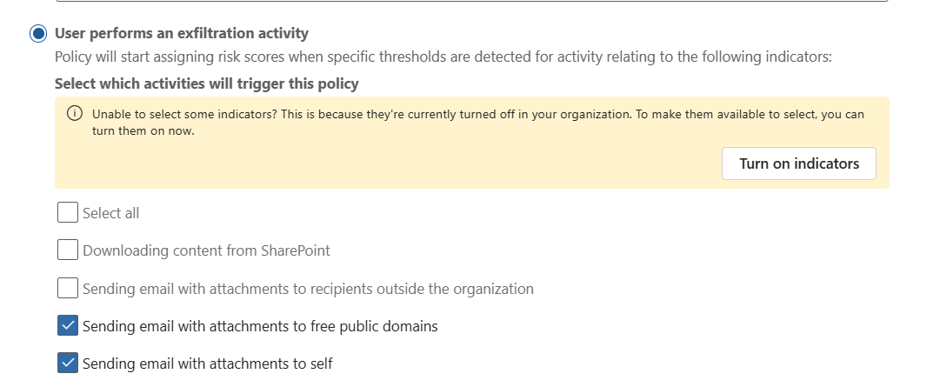
The “remote work” excuse – emailing sensitive attachments to their own personal accounts (Gmail, Outlook.com, etc).

Mitigate this by creating a policy for detecting emails with attachments sent to personal email accounts or other external recipients.

How to use these settings: Select indicators for email activity to external recipients and focus on messages that include attachments. If available in your configuration, narrow the scope to personal domains and combine the policy with sensitivity labels or priority content so that high-value data is reviewed first.

Implementation Tip: Detect emails with attachments to personal domains. Correlate this with sensitivity labels to prioritise high-value data.

The Drip transfer risk

There are users who try to be sneaky by diong small, repeated transfers over time that individually look benign but collectively represent a significant leak.

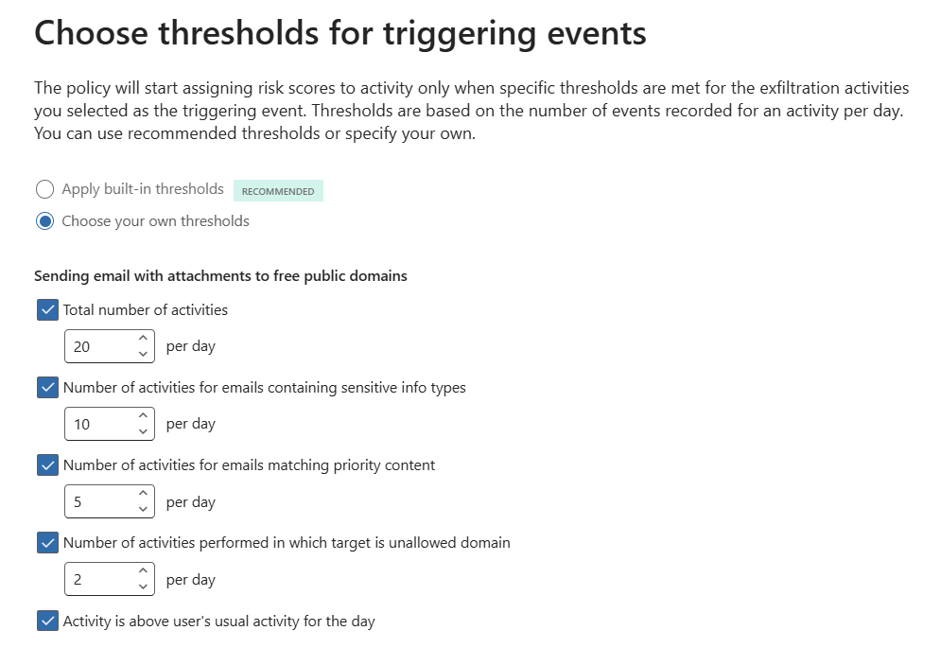
To mitigate this, set your threshold or sequence settings for repeated low-volume transfers to the same external recipient over time. You can even use the same policy as the Email to Self policy above.

How to use these settings: Set thresholds that look for repeated actions rather than one large event, such as multiple small sends to the same recipient across several days. Tune the volume, frequency, and time window so the policy can identify slow exfiltration patterns without creating too many false positives.

Implementation Tip: Set thresholds for repeated sends to the same external recipient. Use volume-based triggers to catch this slow-and-steady exfiltration.

The “Detour” risk

This is when a user is blocked by DLP and immediately tries a workaround (e.g., downgrading a sensitivity label or using a personal device).

Modify your policy configuration to look for sequence of events where a user has experienced the following: DLP block events, sensitivity label downgrade signals, or related sequence detection settings for attempted workarounds.

How to use these settings: Configure the policy to look for a DLP block followed by a related action that suggests circumvention, such as a label downgrade or a second attempt through another route. The key is to use sequence-based detection so the system recognises the pattern of behaviour, not just a single isolated event.

Implementation Tip: Trigger on DLP blocks followed by label downgrades. This pattern is a strong indicator of intentional circumvention.

The Agentic AI risk

AI agents and copilots now act on behalf of users, accessing and moving data. 94% of organisations report AI is increasing insider risk. If your organisation does not have the basic data proctection control, there is a high-likelihood of data risk.

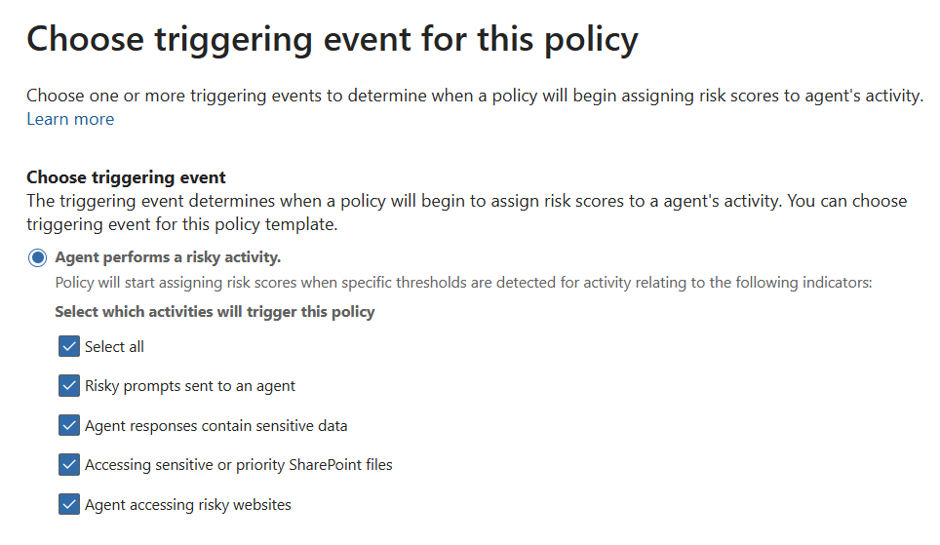
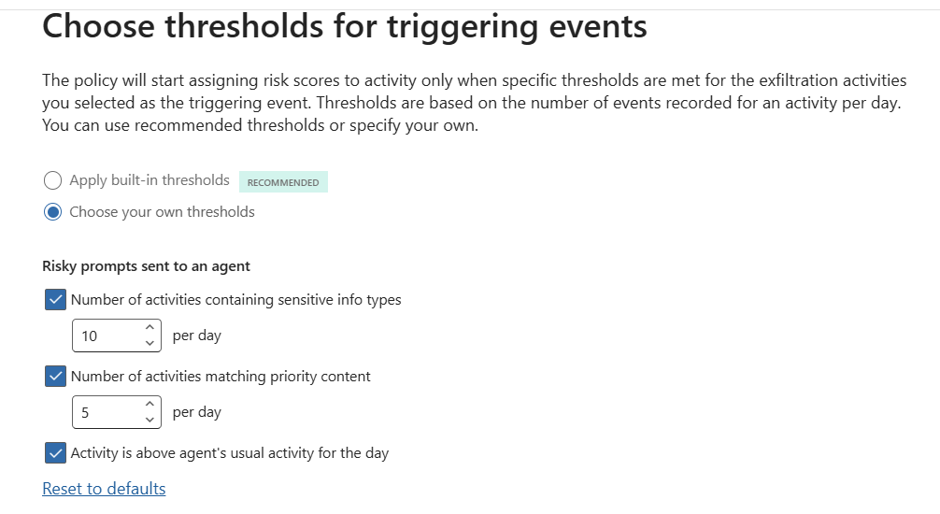
To mitigate this risk: Use both Purview Insider Risk Mnanagement and Purview Data Security Posture Managenent to create policies that specifically looks for risky AI usage.

Similar to you basic policies, you can create thresholds to identify false positives to true positives.

Conclusion: Starting Small, Thinking Big

Don’t try to boil the ocean. Start with a pilot group (e.g., M&A or Finance). Insider Risk Management is a journey of cultural and technical maturity.

It’s about building a resilient organisation where data is respected, privacy is protected, and risk is managed collaboratively.

A Practical Guide to Insider Risk Management in the UK

There are many, many post talking about Insider Risk Management but very little that talks about the practical, realistic and field tested approach to Insider Risk Management. This is my attempt to tip the scale towards the latter. I’m skipping the textbook definitions to share real-world scenarios from the trenches specifically, the messy, human problems clients have thrown at me and the practical, field-tested responses we’ve workshopped to address them.

Let’s start with the Human and the strategic foundations of Insider Risk which is…

The Human Element

Let’s be honest: we’ve built digital fortresses with firewalls taller than the Shard and MFA that demands a blood sample. But what happens when the threat isn’t a hooded hacker, but friendly Dave from Sales “backing up” his client list before jumping ship?

In the UK, 90% of organisations face insider incidents annually, and 74% are negligent. People like Dave who aren’t villains, just human [Source: Cybersecurity Insiders]. IRM isn’t about building higher walls; it’s about understanding who’s walking through the gate. With the FCA and GDPR watching closely, “set and forget” security will no longer work.

IRM is a Team Sport

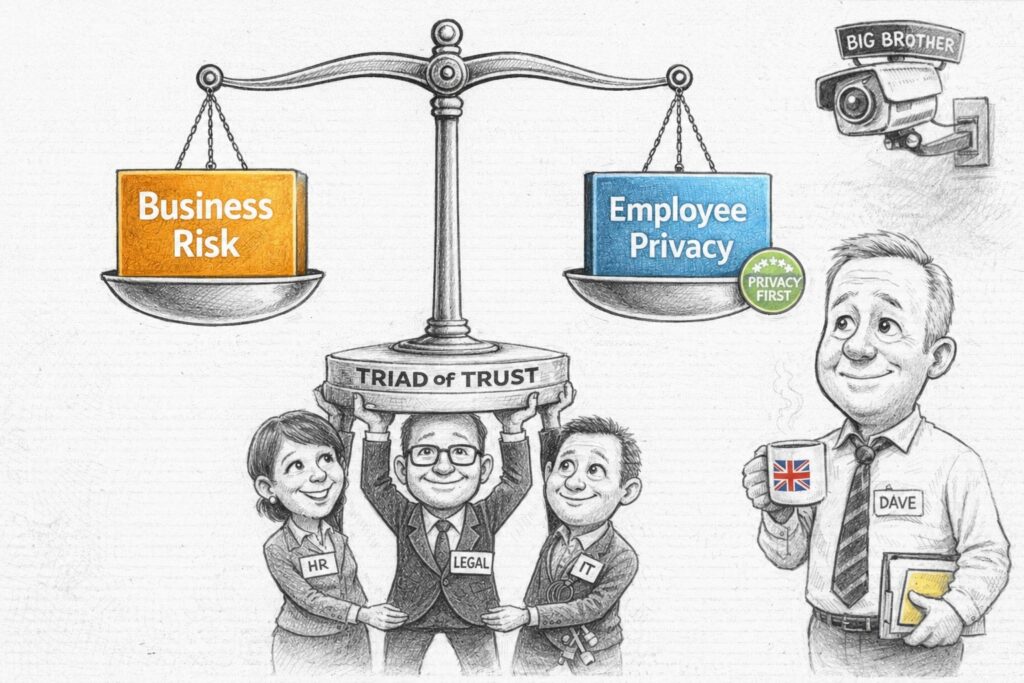
If you think IRM is just a “Cyber Security thing,” you’re in for a rude awakening. It’s more like a heist movie, but instead of stealing diamonds, you’re trying to stop data from walking out the door. And you can’t do it alone. You need a “Triad of Trust” (there’s 4 below since I’ve not used Triad before):

  • HR: They’re the ones who know Dave is leaving. They provide the context—resignations, performance reviews, the “vibes.” Without HR, you’re just watching random data movements and guessing.
  • Legal: They’re the ones who keep you out of court. They ensure your monitoring doesn’t cross the line into “Big Brother” territory, keeping you compliant with employment law, Privacy laws and GDPR.
  • IT/Cyber: You. The tech wizards. You provide the tools (Purview, DLP, Logging) and the forensic skills to figure out what’s actually happening.
  • Business Leaders: They define what “sensitive” actually means. From M&A docs, merger docs; to Customer Support, it’s the client list. One size does not fit all.

Pro Tip: Form a small, cross-functional steering group. Call it the “Data Defence League” if you want. Just get them in a room.

The Privacy Paradox (aka Balancing Monitoring with Trust)

Let’s address the elephant in the room: IRM tools are intrusive by design. They’re supposed to be. They monitor user activity and correlate events to spot patterns. But in the UK, we have a thing called “privacy,” and it’s kind of a big deal. Here’s how you can balance it.

The UK – GDPR Balance:

  • Transparency: Tell people you’re watching. Update those employment contracts. Add it to your Employee Training program, include it your End-user Agreement that they see when they log-in to their Corporate PC. Send an email. Be open. Why: Because secrecy breeds mistrust.
  • Proportionality: Don’t monitor the intern with the same intensity as the Head of M&A. Start with high-risk roles (Tier 1) and expand based on evidence. It’s called “being reasonable.”
  • Pseudonymisation: This is your best friend. Purview keeps data private by default. Analysts see “ANON2340,” not “Dave from HR,” until a formal case is opened. It’s like a mask for your data.
  • Policy-Led Monitoring: Only trigger monitoring when a highly defined policy is breached. This isn’t about general surveillance; it’s about catching specific, pre-agreed risk behaviors. If the policy isn’t broken, the system stays quiet.

You can’t protect what you haven’t classified

Here’s another hard truth. Purview IRM is only as good as the data it can see. If you haven’t done the boring work of classification, you’re flying blind. There’s a clear dependency chain:

  • Sensitivity Labels: The bedrock. If a document isn’t labelled “Confidential,” IRM can’t prioritise it. It’s like trying to find a needle in a haystack without knowing what a needle looks like.
  • Sensitive Information Types (SITs): Teach Purview to recognise UK-specific data like NINs, IBANs, or NHS numbers. If it doesn’t know what a NIN is, it can’t protect it.
  • Data Loss Prevention (DLP): DLP is the “first line of defence.” IRM is the “second line” that investigates when DLP is bypassed or when subtle patterns emerge. Think of DLP as the bouncer and IRM as the detective.

Warning: If your DLP policies are noisy or your labels are inconsistent, your IRM alerts will be useless. Start by tuning your DLP and Classification strategy before turning on IRM. Otherwise, you’ll just be drowning in false positives.


Questions from my clients HR, Legal and Business Operations team

Q1 (HR/Legal): “How do we ensure we aren’t creating a ‘Big Brother’ culture that destroys employee morale?”

Answer: Focus on “Privacy by Design.” Use pseudonymisation, limit access to investigation data to a need-to-know basis, and ensure all monitoring is tied to a legitimate business interest (e.g., protecting IP) rather than general performance monitoring. Transparency is your best defence against mistrust. Think of it as “security with respect.”

Q2 (Business Ops): “How do we distinguish between ‘normal’ high-volume work and ‘risky’ data exfiltration, especially in data-heavy roles like Legal or Finance?”

Answer: Use “Scoped Policies” and “Baseline Behaviour.” Purview allows you to set different thresholds for different groups. A Legal team downloading 500 files for a DSAR is normal; a Sales rep doing the same is a risk. Use group-based scoping to reduce false positives and respect business context. It’s about context, not just volume.

Q3 (Legal/Compliance): “What are the legal repercussions for a first-time offender versus a repeat offender?”

Answer: Define a “Graduated Response” framework. First-time negligent offenses should trigger coaching and re-training. Repeat offenses or malicious intent should trigger formal HR/Legal escalation. Consistency is key to procedural fairness. Don’t fire Dave for a first-time mistake; teach him.

Q4 (IT/Security): “How do we handle long notice periods (e.g., 3-6 months) for senior leavers?”

Answer: Map AD “accountExpires” attributes to IRM triggering events. Configure a 90-day pre-expiry monitoring window to catch pre-resignation data gathering. It’s like having a security camera on the exit door.

Q5 (HR): “How do we integrate IRM with our existing HR processes for terminations?”

Answer: Use HR connectors to automatically flag resignations or terminations. This ensures IRM policies are triggered without manual intervention, reducing the risk of human error. Automate the boring stuff.

Q6 (Business Leaders): “How do we measure the success of our IRM programme?”

Answer: Track metrics like “Mean Time to Investigate,” “False Positive Rate,” and “Number of High-Severity Cases Resolved.” The goal is to move from reaction to resilience. Show them the value, not just the alerts.

Creating an Insider Risk Management Strategy: A Simplified Guide

When thinking about Insider Risk Management strategy, it’s easy to get lost in a maze of complex solutions and cutting-edge technologies. However, before we dive into program specifics, let’s take a step back.

Simplification is our guiding principle here, and it brings us to the core four elements essential for any successful strategy: People, Process, Technology, and Implementing the Action.

People: The Core of Insider Risk Management

Insider risk management starts with understanding that your people are both your biggest asset and potential risk. Training and awareness are crucial. Employees should be aware of the organization’s policies, the significance of data protection, and the consequences of non-compliance. Engage departments across the board—security, HR, legal—to foster a culture of accountability and transparency. Regular training ensures everyone is up-to-date on the latest protocols and threats.

Ask yourself the following:

  • How can we enhance our current training programs to better address the specific risks and policies relevant to our organization, ensuring all employees are not only aware but fully understand their role in data protection?
  • In what ways can we foster a stronger culture of accountability and transparency within our organization, encouraging open communication between departments such as security, HR, and legal?
  • What measures can we implement to regularly update and refresh our team’s knowledge on the latest data protection protocols and potential insider threats, keeping our defenses as current as possible?

Process: Streamlining Risk Management

The process involves setting up a clear, structured approach to identifying, investigating, and responding to insider threats. Begin with establishing clear policies using Microsoft Purview Insider Risk Management, which offers templates for common scenarios like data theft by departing users or unintentional data leaks. Regular audits and analytics help in preemptively identifying potential risks, while a defined triage process ensures timely response to alerts. Cases are managed systematically, from investigation to action, ensuring a thorough review and appropriate response to each incident.

Ask yourself the following:

  • How can we tailor Microsoft Purview Insider Risk Management templates to better reflect our organization’s specific risk scenarios and policies, ensuring a more targeted and effective approach?
  • What strategies can we implement to enhance our regular audit and analytics processes, enabling us to identify potential insider risks more proactively and accurately?
  • How can we improve our triage process for responding to alerts, ensuring that each case is addressed timely and efficiently, from investigation to action?

Technology: Leveraging Microsoft Purview for Enhanced Security

Technology underpins the entire insider risk management framework. Microsoft Purview Insider Risk Management provides a comprehensive suite of tools for monitoring, detection, and response. Use its analytics for a deep dive into user activities, identifying anomalies that could signal potential risks. The platform’s case management feature streamlines investigations, integrating data from various sources for a holistic view of each incident. Collaboration tools facilitate cross-departmental action, ensuring a unified response to insider threats.

Ask yourself the following:

  • In what ways can we optimize the use of the platform’s case management features to ensure a more efficient investigation process, integrating data from diverse sources for a comprehensive analysis of incidents?
  • What steps can we take to enhance collaboration across departments using the tools provided by Microsoft Purview, ensuring a coordinated and unified response to insider risks?

Implementing Your Strategy

  1. Audit and Analytics: Activate auditing to track activities within your organization. Use insider risk analytics to scan for potential risks even before setting up specific policies.
  2. Policy Setup: Choose from Microsoft Purview’s policy templates tailored to different risk scenarios. Customize these to align with your organization’s specific needs.
  3. Alert Management: Configure alerts to notify you of suspicious activities. Establish a process for reviewing, evaluating, and addressing these alerts efficiently.
  4. Investigation and Action: Investigate incidents with the aid of user activity reports and take decisive actions based on your findings. Collaborate with HR, legal, and security teams to ensure comprehensive case management.
  5. Continuous Review and Optimization: Regularly review your insider risk policies and processes. Update them as needed to adapt to evolving threats and organizational changes.

In essence, managing insider risks effectively requires a blend of proactive people engagement, streamlined processes, and advanced technology.

By leveraging Microsoft Purview Insider Risk Management and Communication Compliance, organizations can establish a robust framework that mitigates risks while fostering a culture of security and compliance.

For more detailed guidance on setting up and optimizing your insider risk management framework with Microsoft Purview, you can explore resources directly from Microsoft Learn and Microsoft Security playlist.

Additional resources: